Choosing a CMS today is not just a design decision.
It affects scalability, integrations, SEO performance, ownership, and long-term cost.
Two platforms dominate many conversations: WordPress and Webflow.
At RiLel Digital Studio, we build with both modern frameworks and custom platforms, but WordPress remains our primary recommendation for most business websites.
Why?
Let’s break it down honestly.
Market Reality: WordPress Is Still the Standard
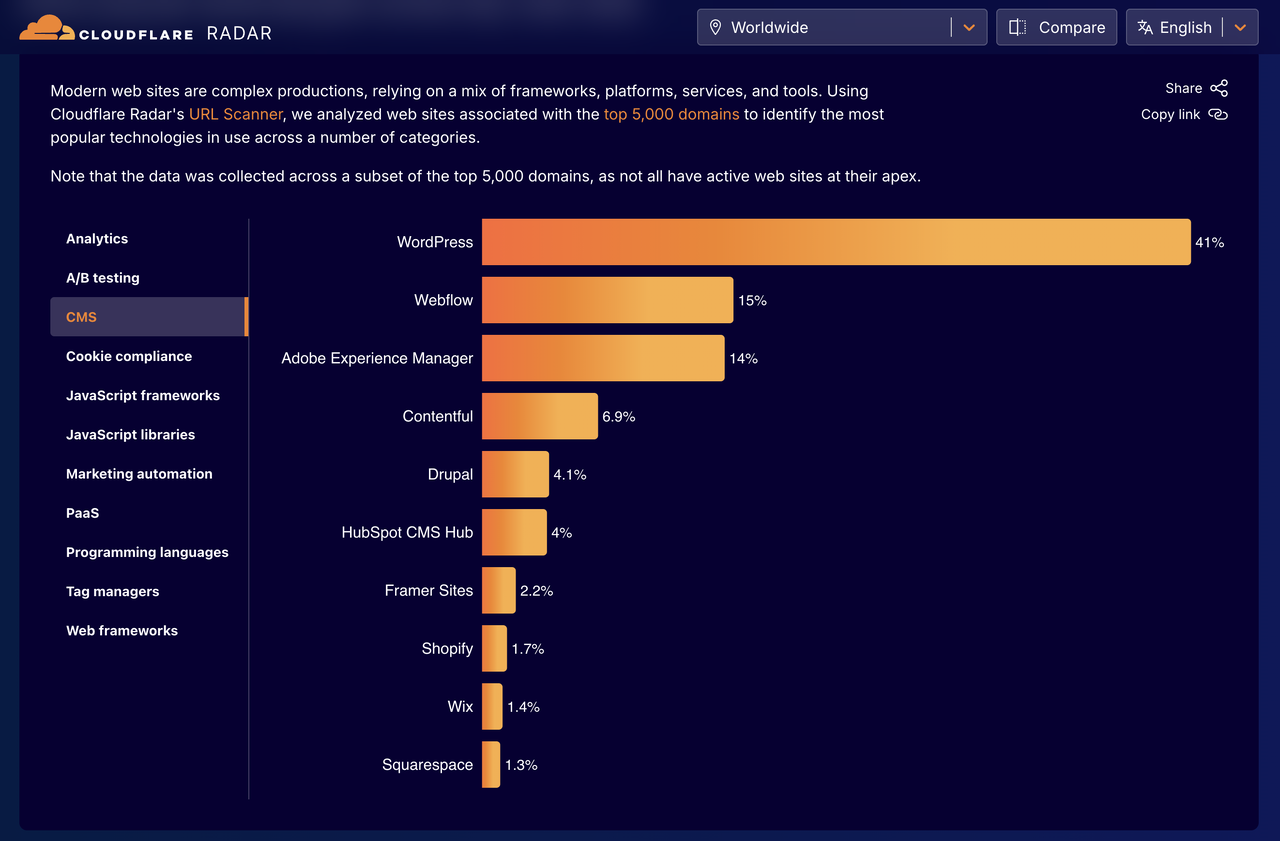
Recent data from Cloudflare Radar shows that WordPress powers over 40% of the analyzed top domains, significantly ahead of Webflow and other CMS platforms.
This matters.
Popularity at this scale means:
- larger talent pool
- better ecosystem
- more integrations
- long-term stability
- easier hiring & maintenance
No company wants to be stuck with a platform few developers can support.
Why We Usually Recommend WordPress
1) You Own Your Website
With WordPress, you are not locked into a single vendor.
Hosting, codebase, backups, data — all portable.
If tomorrow you want to change your agency or infrastructure, you can.
2) Flexibility Without Limits
WordPress can be:
- marketing site
- SaaS frontend
- e-commerce store
- membership system
- LMS
- multilingual enterprise site
- headless backend for React / Next.js
You are not limited by platform rules.
When businesses grow, this becomes critical.
3) Serious SEO Capabilities
Technical SEO is where WordPress shines.
You get full control over:
- URL structure
- metadata
- schema
- redirects
- sitemaps
- page speed optimization
- server configuration
For growth-driven companies, this control is gold.
4) Plugin & Integration Ecosystem
CRMs, payment systems, ERPs, marketing automation, analytics.
If it exists, WordPress probably integrates with it.
If it doesn’t — we can build it.
5) Cost Efficiency at Scale
Webflow looks simple at the start.
But as traffic, content, and features grow, subscription costs stack up quickly.
WordPress infrastructure can scale more economically long term.
6) Custom Development Freedom
At RiLel Digital Studio, we often build:
- custom calculators
- API integrations
- complex forms
- gated content
- dashboards
- dynamic content systems
WordPress lets engineering lead the solution — not platform limitations.
Where Webflow Can Be a Better Choice
Now, let’s be fair.
Webflow is excellent in certain scenarios.
Webflow is great when:
✔ you need a beautiful marketing site fast
✔ design autonomy matters more than deep functionality
✔ small team, minimal integrations
✔ no complex backend logic
✔ you want visual editing without developers
For early-stage startups or temporary campaigns, this can be perfect.
The Question Most Businesses Forget to Ask
Not:
“Which builder is easier today?”
But:
“What will my business need in 2–3 years?”
Because migrations later are expensive.
Very expensive.
Our Philosophy at RiLel Digital Studio
We build platforms that grow with companies.
For most serious businesses, that means:
- ownership
- extensibility
- integration capability
- strong SEO and AIO foundation
- freedom to customize
Which is why WordPress wins more often than not.
Final Verdict
If you need speed and design independence → Webflow can be fantastic.
If you are building a long-term digital asset → WordPress is usually the smarter investment.
If you want, I can also help you understand:
- which platform fits your roadmap
- expected future integrations
- scaling risks
- migration costs
- performance expectations
Frequently Asked Questions
For most growing businesses, WordPress offers greater flexibility, deeper integrations, stronger SEO control, and full ownership of the website. Webflow can be better for quick, design-focused marketing sites with limited functionality.
Agencies often choose WordPress because it allows custom development, API integrations, advanced SEO configuration, and easier scaling as business needs evolve.
Webflow is ideal for startups or teams that prioritize design speed, visual editing, and simpler websites without complex backend requirements.
Both platforms can perform well, but WordPress provides more advanced control over technical SEO, structured data, plugins, and performance optimization.
Yes, but migrations can be time-consuming and costly. Planning for future growth early often makes WordPress the safer long-term decision.
Not Sure What’s Right for You?
Choosing a platform is easier when it’s aligned with your growth roadmap.